
The Best Prompt on Your Team Is the One Nobody Else Can See
You prompt, let it run, deslop it, re-prompt. It works until the window closes. Skills, Rules, and Subagents are how you teach the agent once and let it remember — alone and on a team.
By Michael Lynn • 7/11/2026
Share:
A lot of people I know are building with AI right now. You're shipping things in an afternoon that would've eaten a week a couple years ago, if you could even get past the blockers that used to steal whole evenings.
And if you're anything like me, you've gotten pretty good with the tools. Cursor, Claude Code, Codex, whatever's in your rotation. You prompt, let it run, check the diff, maybe deslop it, re-prompt, and keep shaping the thing until it looks right. It works. Then the chat closes. The good result lived and died in one session. Next week you hit the same wall and spend twenty minutes hunting for the prompt that saved you last time.
What if you could teach the agent once, and let it remember? Take the prompt that finally worked and turn it into something it reaches for on its own.
That's Skills, Rules, and Subagents. Skills are your best prompts, saved. Rules are the standards the agent always follows. Subagents are the specialists for the heavy lifting. Cursor is where they sit together in the repo instead of in your head.
I thought I understood all three before I joined Cursor. I'd written them on my own projects. File goes in
.cursor/, agent reads it, life gets easier. For a single developer grinding alone, that story mostly holds.What I didn't understand was the hard part once a few hundred engineers share a codebase. Not the markdown. Not the frontmatter. Who owns the agent knowledge, and what happens when nobody does.
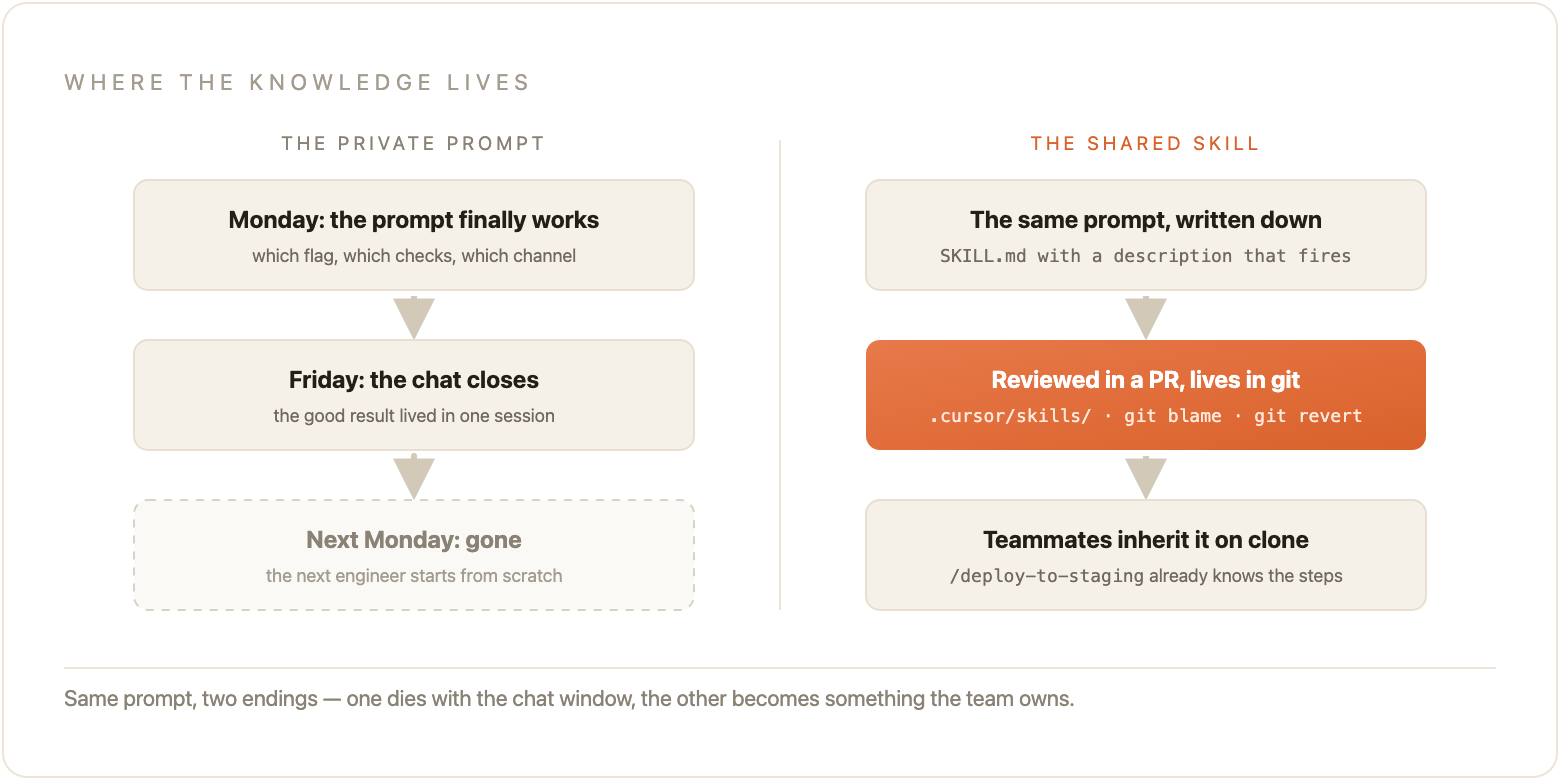
The same pattern kept showing up once I started talking to enterprise teams. Someone spends a week getting the staging deploy prompt right: which secrets file, which smoke checks, which Slack channel gets the link, the weird flag you have to pass or the health check lies. By Friday it works. By Monday it lives nowhere except that person's chat history. The next engineer types a worse version, misses the flag, burns an afternoon, and both of them walk away thinking Cursor is inconsistent. It wasn't. The knowledge was private. Same wall I hit alone, just multiplied.
So I dug in. How do teams that make this work actually organize Rules vs Skills vs Subagents? Where does ownership live? What belongs in the dashboard versus the repo? What breaks when you treat agent config like personal preference instead of something you review in a PR?
This post is what I found. If you're already getting results and want them to stick around past one chat window, start here.
Before you build anything
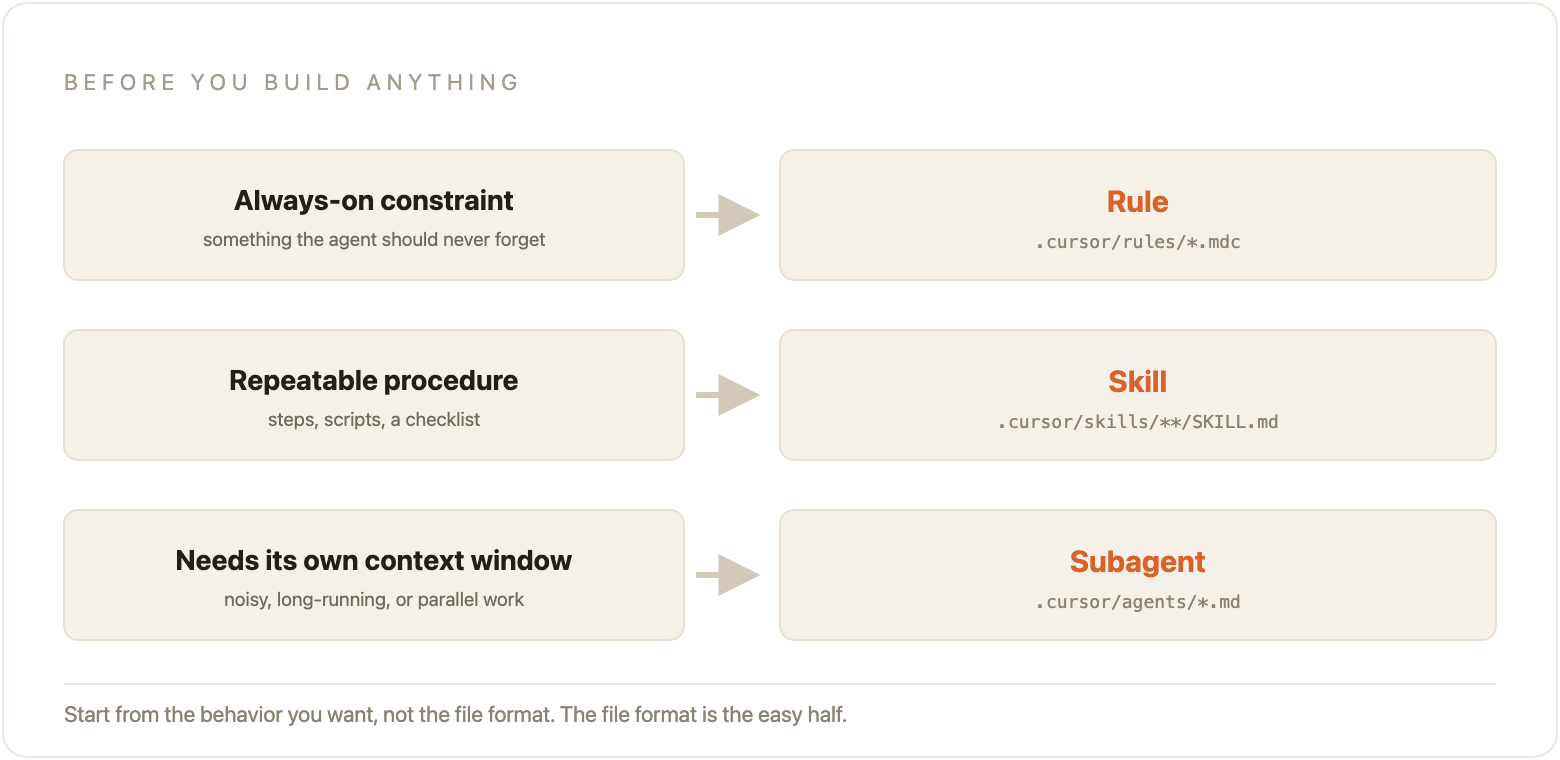
Before you write a single file, figure out what you're actually trying to do. Sounds simple, but start from the behavior you want, not the file format.
If it's always-on behavior, a constraint the agent should never forget, that's a Rule.
If it's a repeatable multi-step procedure with steps, scripts, or a checklist, that's a Skill.
If the work needs its own context window, or needs to run in parallel without flooding the main chat, that's a Subagent.
| Primitive | One line |
|---|---|
| Rules | Always-on instructions injected into Agent conversations. |
| Skills | Reusable procedures, invoked when relevant, able to include real executable scripts. |
| Subagents | Specialists with their own context window, for work that's noisy, long, or parallel. |
Most teams I talk to over-engineer this decision. They build a Skill when a one-line Rule would have done it. Or they write a vague Skill whose description never matches what anyone actually types, so it never fires. Get this part right first. The file format is the easy half.
One minor tip that might seem obvious, but I see a lot of builders missing this is that Rules apply to Agent chat. They do not apply to Tab completion or Inline Edit. If you're wondering why your carefully written naming convention still gets ignored when you hit Cmd+K, that's why.
Rules: the always-on layer
A Rule is not a prompt you paste once. It gets injected at the start of the conversation, before you type anything. The model reads it as persistent context... sort of RAG-like. That's a different relationship than "please remember this for the next five minutes."
How a Rule can fire
Cursor gives you four app modes for each rule.
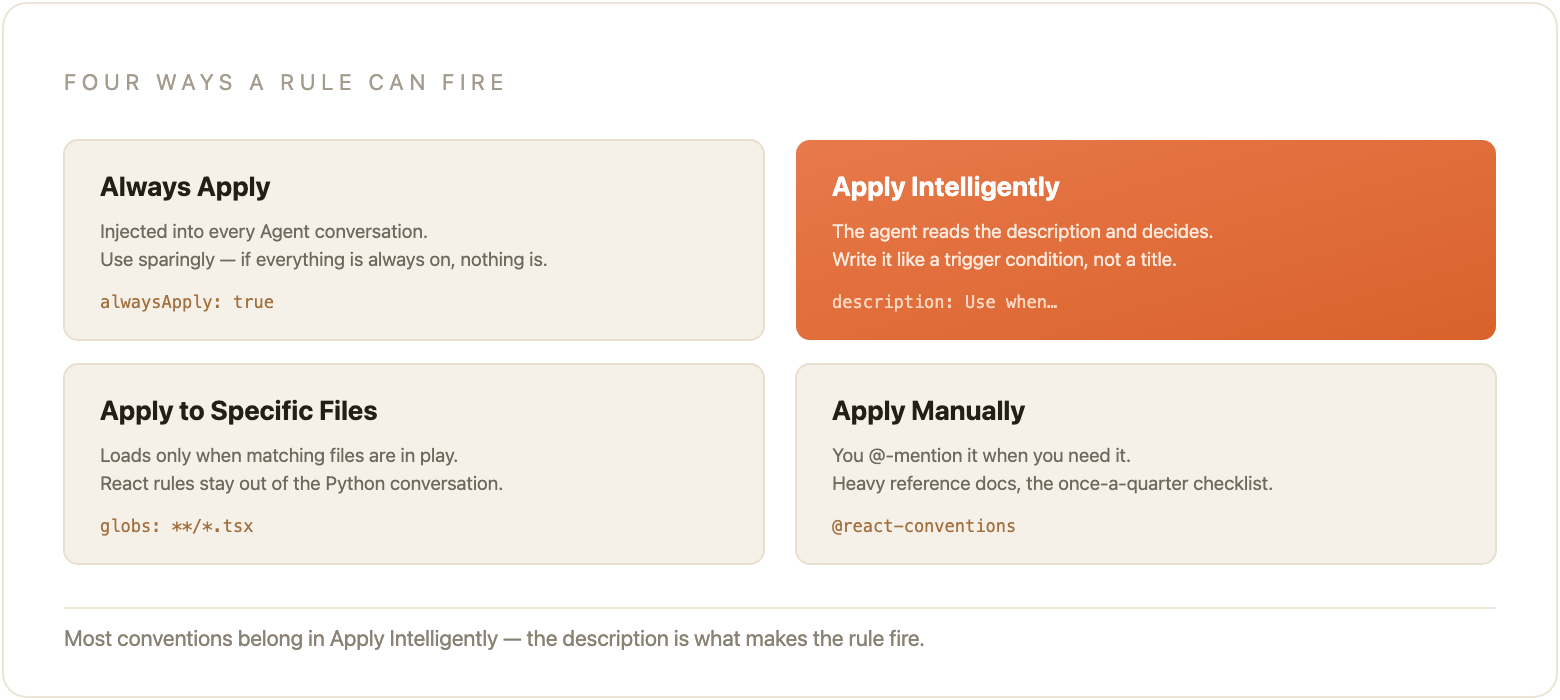
Always Apply. Every Agent conversation. Use this sparingly. Copyright headers, a hard ban on default exports, a security constraint that really is universal. If everything is Always Apply, nothing is.
Apply Intelligently. The agent reads the
description field and decides whether the rule is relevant. This is where most framework-specific conventions belong. The description is the whole game. Write it like a trigger condition, not a title.Apply to Specific Files. Glob patterns. Your React conventions only load when
*.tsx files are in play. Your Python style guide stays out of the TypeScript conversation.Apply Manually. You
@-mention it when you need it. Heavy reference material, the long doc you don't want in every context window, the checklist you pull in once a quarter.Here's a real shape for an Apply Intelligently rule. Notice the description does the work:
md code-highlight---
description: React component conventions for this codebase. Use when creating or editing React components, hooks, or *.tsx files.
alwaysApply: false
---
# React components
- Named exports only. No default exports.
- Colocate the test file next to the component: `Button.tsx` / `Button.test.tsx`.
- Prefer the patterns in `src/components/Button.tsx` over inventing a new one.
A good Rule is short, enforceable, and specific. "Always use named exports; no default exports" works. "Help with React components" does not. The second one fails the same way vague meeting notes fail: the agent has nothing concrete to obey, so it improvises, and you end up with three different component styles in one PR.
Keep individual rules under 500 lines. Split the big ones. Point at a canonical file instead of pasting its contents into the rule. I've seen teams dump an entire style guide into Always Apply and then wonder why every chat feels sluggish. The model was carrying a phone book it only needed two pages from.
Team Rules vs project rules
This is the part a lot of people miss.
Team Rules live on the Cursor dashboard, not in any repository. On Team and Enterprise plans they apply to everyone on the team, across every project, automatically. You can leave them toggleable, or enforce them so nobody can switch them off. Compliance language, org-wide security constraints, the two or three standards that are non-negotiable: that's the dashboard.
Project rules live in git under
.cursor/rules/ as .mdc files. Creating a rule is a PR. Updating a rule is a PR. Rolling back a bad rule is git revert. That means the history of why a convention exists is git blame, not a Slack thread from eight months ago that nobody can find.There's also
AGENTS.md: plain markdown, no frontmatter, drop it at the root or in a subdirectory. Nested AGENTS.md files combine, and the more specific one wins. It's the lightweight door into the same idea when you don't need the trigger matrix yet.When they collide: Team Rules win, then Project Rules, then User Rules. All applicable rules get merged; earlier sources win on conflict.
If you have the same conventions across several repos, GitHub import exists for a reason. Customize → Rules → Add Rule → Remote Rule (GitHub). One shared repo, many consumers. We'll come back to that pattern when we talk about Skills.
Skills: the procedure layer
Rules are constraints. Skills are workflows.
A Rule says "named exports only." A Skill says "here's how we deploy to staging: run these checks, call this script, verify these three things, post the URL here." Ten steps, a shell script, a reference doc, a verification checklist. That's the difference between a sentence and a procedure.
Where they live
text code-highlight.cursor/
└── skills/
    ├── shipping/
    │   └── deploy-to-staging/
    │       ├── SKILL.md          ← required
    │       ├── scripts/
    │       │   └── deploy.sh
    │       └── references/
    │           └── staging-checklist.md
    └── debugging/
        └── with-datadog/
            └── SKILL.md
A few details that matter in practice:
The folder that contains
SKILL.md is the skill's identity. Nest categories however you want. Cursor walks the tree recursively.Project skills live in
.cursor/skills/ (or .agents/skills/). Personal ones live in ~/.cursor/skills/. The ones in the repo are the ones your teammates inherit when they clone.references/ and scripts/ load on demand. Keep SKILL.md lean. Put the deep docs and the executable steps beside it, not inside it. You don't want the deploy checklist chewing context on a CSS tweak.The description field is the skill
Here's a working frontmatter block:
yaml code-highlight---
name: deploy-to-staging
description: >
  Deploy the app to staging. Use when deploying code, cutting a
  release, or when the user mentions staging, environments, or deploy.
paths: "apps/api/**"
disable-model-invocation: false
---
name must match the parent folder. description is what the agent reads to decide whether to auto-invoke. Vague description means the skill never fires, or fires when it shouldn't.Bad: "Helps with deployments."
Good: "Deploy the app to staging. Use when deploying code, cutting a release, or when the user mentions staging, environments, or deploy."
Write it as "Use when…" with the actual words your teammates type.
paths scopes the skill to matching files. A Python style skill shouldn't surface on a CSS file. In a monorepo you often don't need paths at all, because of nesting.Set
disable-model-invocation: true when the skill should behave like a slash command only: /deploy-to-staging, never auto. Destructive operations belong here. Anything that pushes, deletes, or pages people.Monorepos get scoping for free
text code-highlightmy-monorepo/
├── .cursor/skills/              ← repo-wide
│   └── land-it/SKILL.md
└── apps/
    └── web/
        └── .cursor/skills/      ← auto-scoped to apps/web/**
            └── deploy-web/SKILL.md
A skill nested under
apps/web/.cursor/skills/ only gets fired when you're working with files under apps/web/. Each sub-team owns their own directory. No paths configuration required for that scoping. I've seen this quiet feature save more arguments than any style guide I've written.Build them with the agent
Type
/create-skill in Agent chat and describe what you want. There's also /create-rule, /create-subagent, and /migrate-to-skills.That last one is the fastest way for any team that already has a number of dynamic rules and slash commands. It converts the ones that were really procedures all along into Skills format. Always-on rules and globbed rules stay as Rules, which is correct. Don't migrate what shouldn't move.
A fuller example
markdown code-highlight---
name: deploy-to-staging
description: >
  Deploy the app to staging. Use when deploying code, cutting a
  release, or when the user mentions staging, environments, or deploy.
---

# Deploy to staging

## Preconditions
- Working tree clean, or changes intentionally included
- CI green on the branch you're deploying
- You have staging credentials loaded (see references/secrets.md)

## Steps
1. Run the unit and integration suites for the affected packages.
2. Execute `scripts/deploy.sh` with the target SHA.
3. Wait for the health check at `/healthz` to return 200.
4. Run the smoke checklist in `references/staging-checklist.md`.
5. Post the staging URL to #eng-deploys.

## If anything fails
Stop. Do not retry blindly. Capture the failing step and open a thread
with the logs before attempting another deploy.
That skill is not super clever. It's the prompt somebody already figured out, written down once, sitting in git where the next person inherits it on Monday without asking anyone.
One practical note on sharing across repos. The GitHub import path lives under Customize → Rules → Add Rule → Remote Rule (GitHub), even when what you're importing is skills. The UI label is a little confusing. Stand up a
team-cursor-skills repo for the procedures that travel. Keep the weird, repo-specific stuff in that repo's own .cursor/skills/. New engineers don't get a Notion page. They get an agent that already knows how your team deploys.Subagents: the specialist layer
Most teams should start with Skills and stay there for a while. Subagents earn their keep when the work itself is the problem: noisy intermediate output, long research, or something you want running in parallel without stuffing the main conversation.
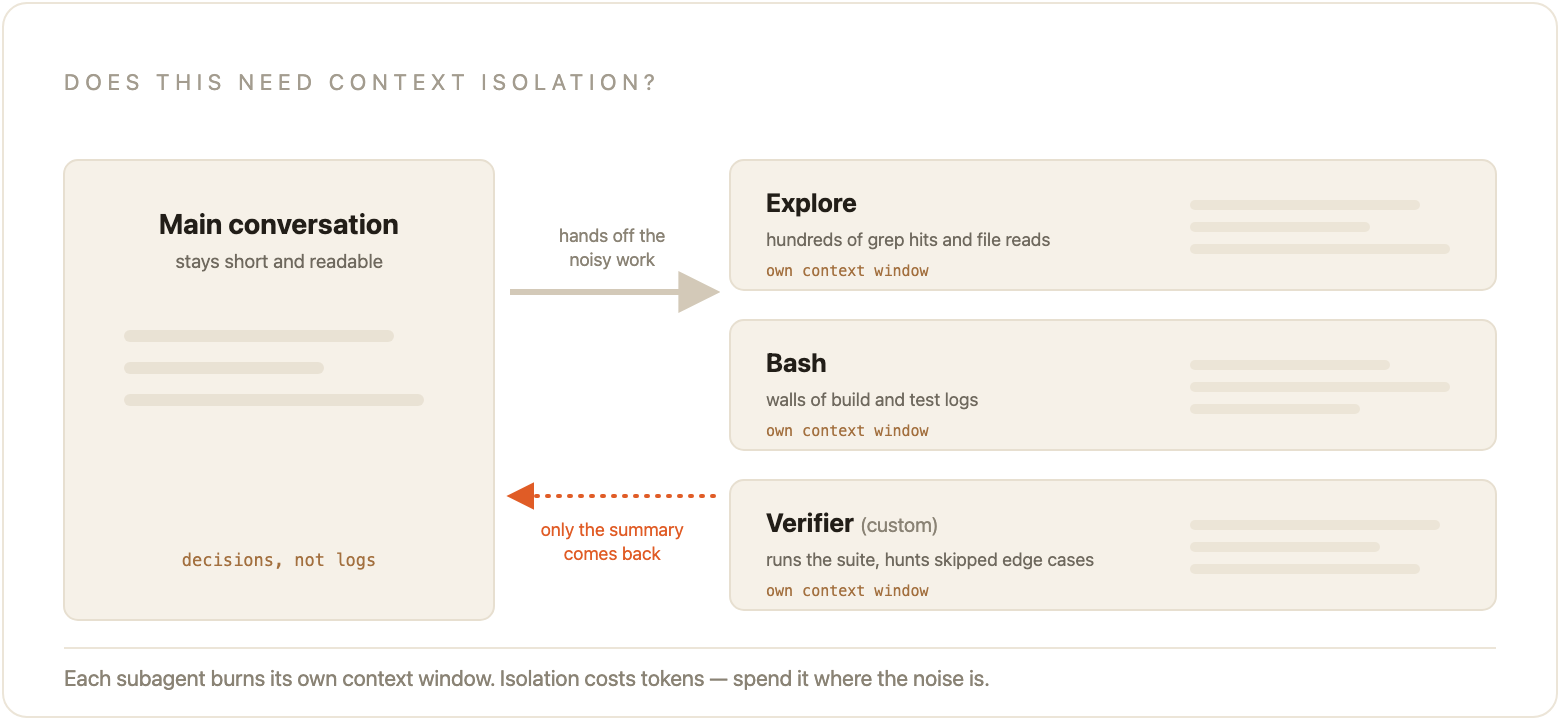
The question I ask: does this need context isolation? If the answer is no, use a Skill.
Built-ins you already have
Cursor ships three built-in subagents and uses them automatically when the job fits:
Explore for codebase search and analysis. Lots of intermediate results, often a faster model, many searches in parallel. The noise stays in the subagent; you get the summary.
Bash for a series of shell commands. Verbose logs don't flood your main thread.
Browser for browser work via MCP. DOM snapshots and screenshots get filtered down to what matters.
You don't configure these. They're already there.
When to build a custom one
Custom subagents live in
.cursor/agents/ and commit with the repo. Create one with /create-subagent, or write the markdown yourself.A few patterns I've seen pay rent more than once:
Verifier. Skeptically checks that work claimed complete actually works. Runs the tests, looks for the edge cases the happy path skipped, flags the half-finished implementation.
Test runner. Sees a code change, runs the relevant suite, tries to fix failures without turning the parent chat into a wall of red.
Security auditor. Reviews auth, payment, and data-handling diffs with a narrower brief than "look at this PR."
A minimal custom subagent looks like this:
markdown code-highlight---
name: verifier
description: >
  Skeptically validates that claimed-complete work actually works.
  Use after implementations, before the user opens a PR.
model: inherit
readonly: false
---

You are a skeptical verifier. Assume the implementation is incomplete
until proven otherwise. Run the relevant tests. Check edge cases the
author likely skipped. Report what passed, what failed, and what was
never tested.
When not to bother
| Reach for a Skill when… | Reach for a Subagent when… |
|---|---|
| Single-purpose, finishes in one shot | The work produces a lot of noisy intermediate output |
| No need for a separate context window | You want parallel workstreams |
| Quick, repeatable action | Specialized multi-step expertise that shouldn't pollute the parent chat |
If you're about to build a subagent that generates a changelog or formats imports, stop. That's a Skill.
Cost is real. Each subagent gets its own context window. Five in parallel is roughly five times the tokens. Use them when the isolation is worth it, not because they sound advanced.
I've also watched teams build a custom subagent for something they ran twice, leave it in
.cursor/agents/, and six months later nobody remembers what it was for. Fine as an experiment. Not fine as permanent infrastructure. If the specialist isn't earning its context window on a regular cadence, demote it back to a Skill or delete it.Treat this like code, because it is
Creating a skill is a PR. Reviewing a skill is a PR. Rolling back a bad skill is
git revert. The history of why a rule exists is git blame.I keep repeating that because most teams still treat Cursor configuration as personal preference, something each engineer tunes on their laptop between meetings. Then a new hire joins and rediscovers the staging flag in week three. Then someone leaves and takes the only working deploy prompt with them. The tooling didn't break. The team never put the knowledge somewhere another person could find it.
Review this the same way you review the code it governs.
Patterns that work
Commit the plan. When you use Plan mode on a non-trivial change, paste the plan into
.cursor/plans/ (or wherever your team agrees) and commit it with the feature PR. Future you, and future teammates, get the intent alongside the diff. I've watched people reconstruct "why did we do it this way?" from a committed plan in ten minutes that would have taken an afternoon of digging through Slack.Review skills in PRs. Same bar as application code. Is the description specific enough to fire at the right time? Are the steps clear enough that a new hire's agent could follow them? Is the scope right, or did someone accidentally make a repo-wide skill out of an
apps/web procedure?Turn your best prompts into Skills. The planning prompt you paste every Monday morning? That's
/feature-plan. Give it sections for acceptance criteria, risks, and what you will not do in this PR. The bug fix checklist with the minimal reproduction steps you always forget until code review? /bugfix-plan. The security pass you wish everyone ran on auth and payment changes? A Skill that points at a security-auditor subagent. The prompt that only lived in your chat history becomes something the team owns.I am biased toward starting with planning Skills. They change the shape of the work before any code gets written, which is usually cheaper than fixing the code afterward.
Who owns what
| Tier | Owned by | Lives in | Best for |
|---|---|---|---|
| Org | Platform / DevEx | Cursor dashboard (Team Rules) | Enforced standards, compliance |
| Team | Feature teams | .cursor/ in each repo | Codebase-specific conventions and workflows |
| Individual | Each developer | ~/.cursor/ | Personal preferences that shouldn't bind anyone else |
Org sets the floor. Teams encode how this codebase works. Individuals keep the quirks that are theirs alone. When those layers get confused, you get either everything personal (and nothing shared) or everything enforced from the center (and nobody contributes).
The shared GitHub repo pattern is the closest thing we have to a package manager for this knowledge. One
team-cursor-skills repository. Import it into the projects that need it. A new engineer clones any of those projects and inherits the accumulated procedures on day one. Not as a Notion doc they'll skim once. As something the agent actually uses while they work.Week one
If you're starting from scratch:
Ask your three most active Cursor users what they type into the agent every week. Those answers are your first Skill candidates. Don't brainstorm abstractions. Harvest the prompts that already work.
Run
/migrate-to-skills on whatever dynamic rules and slash commands you've already piled up.Commit
.cursor/skills/ to the main repo. Make the first PR boring and useful.Create one enforced Team Rule in the dashboard for the single standard that is actually universal. One. Not twelve.
If you already have Rules:
Run
/migrate-to-skills and move the procedures out of the always-on layer.Walk your existing rules against the trigger matrix. Always Apply should be rare. Apply Intelligently needs a real description. File-scoped rules need honest globs.
Build one shared planning Skill from the prompt your team already trusts.
The signal I watch for: as Skills accumulate, average PR size tends to come down. Smaller PRs usually mean the planning got more specific and the execution got more scoped. That's a healthier system than "the agent wrote 2,000 lines and we spent Thursday reviewing it."
Where to start
The first five skills are the hardest. You're inventing the habit: write it down, put it in git, let someone else review the description. After that, people start contributing because they've felt the difference between rediscovering a deploy prompt on Monday and having
/deploy-to-staging already know the steps. That's the gap between getting lucky in a session and building a setup that makes you a little faster every week.If you want the canonical reference from here:
Start with one skill harvested from a prompt somebody already typed this week. Commit it. See if the next person on your team still has to start from scratch on Monday.