
The Software Factory Is Here - and It Runs on Cursor
Everyone's talking about an AI-driven SDLC 'software factory.' Here's what that actually looks like now that Cursor has cloud agents, Bugbot, and native intake from Jira, Linear, Slack, and PagerDuty, plus the steps to wire each stage up yourself.
By Michael Lynn • 7/4/2026
Share:
"Software factory" has been a buzzword for as long as I've been writing code. In practice it usually meant a pile of CI scripts, a wiki page nobody read, and a promise that this time the pipeline would run itself. It never quite did. There was always a human in the middle, copying a ticket into a branch name, translating a Slack thread into an actual change, babysitting the deploy.
What's different now isn't the metaphor. It's which steps are still manual. Compiling and deploying, we mostly solved those a decade ago. The translation work is what's left: turning a ticket into a scoped change, a bug report into a fix, a review comment into a follow-up commit. That's the part I always did by hand. Over the last several Cursor releases, that's the part that's started to close.
I want to be concrete about what people mean when they say "software factory," because the term is doing a lot of hand-waving. Below is the honest version, mapped to features that actually shipped, not a roadmap. And because a diagram you can't build is just a poster, each stage includes the steps to wire it into your own repo.
What a software factory actually is
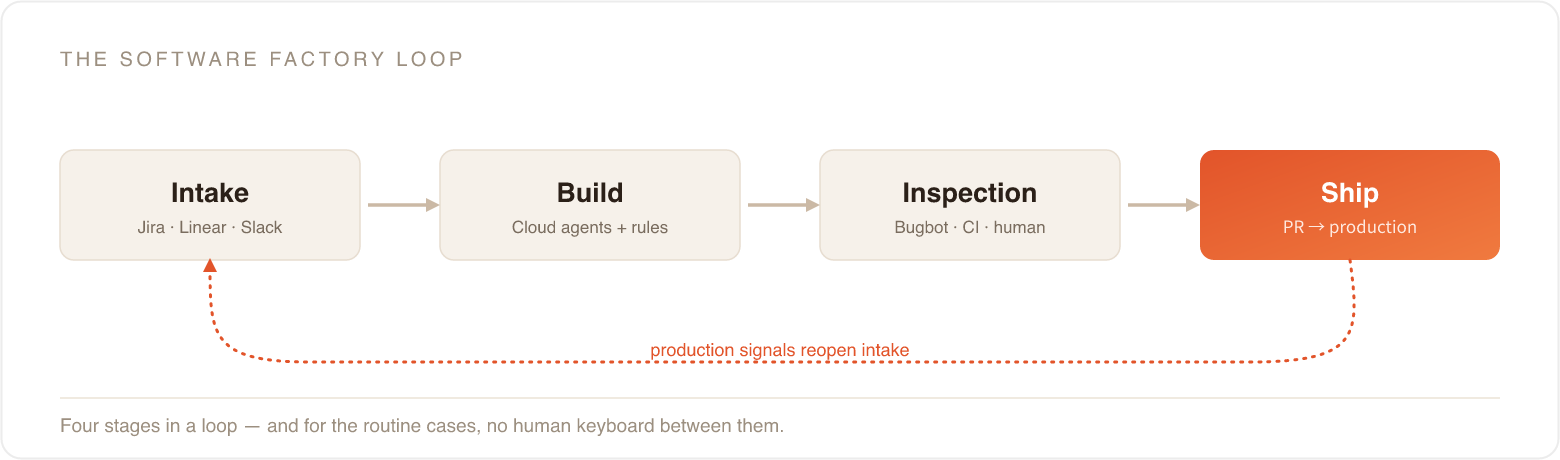
Strip away the marketing and you get four things running in a loop.
Work enters the system where it already lives. That's intake. The work becomes a scoped, testable change. That's build. The change gets reviewed and verified before it ships. That's inspection. Then it goes to production, and what you learn feeds back into intake.
Classic CI/CD only ever automated inspection and shipping. Intake and build stayed manual because they required judgment: reading a ticket, understanding intent, writing the code. The bet right now is that agents are good enough to take the first draft of that judgment, with humans reviewing the output instead of producing all of it.
Intake: work enters where it already lives
The thing that always broke the factory idea, for me, was intake. A ticket in Jira and a branch in GitHub lived in two different worlds, and I was the bridge. I'd read the ticket, decide what it meant, and start typing.
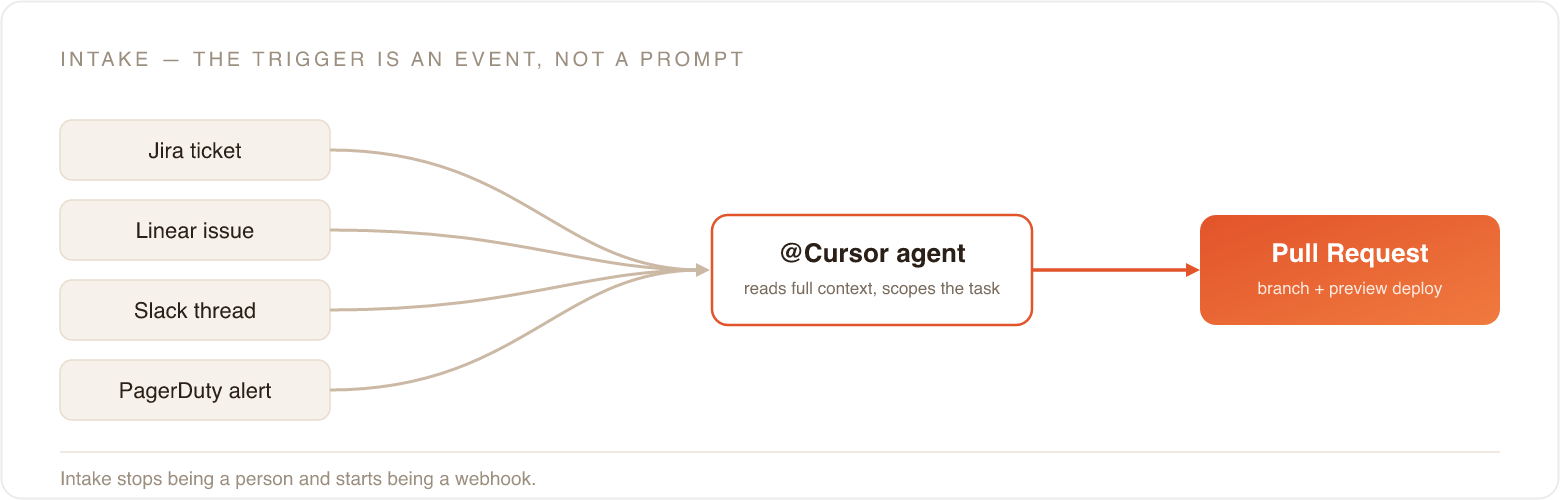
That bridge is now native. Cursor is available directly in Jira: you assign a work item to Cursor or
@Cursor in a comment, and it kicks off a cloud agent that uses the ticket title, description, comments, and your repo settings to scope the task. When it finishes, the ticket itself shows a completion update with a link to the pull request. The Linear integration does the same from an issue, and the Slack integration lets you @Cursor in a thread. It reads the entire thread for context before it starts, so "the bug we talked about above" actually resolves to something.Same pattern underneath all three: the trigger is an event in a tool your team already uses, not a prompt you type into an editor. A new Linear issue, a Slack message, a merged PR, even a PagerDuty incident can start an agent. Intake stops being a person and starts being a webhook.
This is the fastest win, so I'd start here. Open the Cursor dashboard and go to Integrations. Click Connect next to the tool your work actually lives in: Slack, Linear, or Jira. You'll go through an OAuth screen and land back in Cursor. Finish the handshake by connecting GitHub if you haven't, and pick a default repository for that integration. That's the repo agents will branch from.
Then test it end to end. In a real ticket or Slack thread, write
@Cursor and one clear instruction: "fix the null check in the checkout total and add a test." Within a minute you should see it acknowledge, then a link to a PR appear back on the ticket. You didn't write a webhook. You clicked Connect and started addressing an agent the way you'd address a teammate.Build: the agent drafts the scoped change
Once work is in, the cloud agent does what I used to do at 11pm: clone, branch, write the code, run the tests, open the PR. It runs in an isolated cloud VM with a real terminal, so it isn't tying up my machine, and multiple agents can work different tickets in parallel. The output isn't a suggestion in a chat window. It's a branch pushed to GitHub with a PR opened against it.
Two things keep this from being chaos, and they're the parts teams skip.
.cursor/rules/*.mdc encode your repo's conventions: which files are managed and off-limits, that main is protected, how tests are structured. The agent reads them the way a new hire reads the onboarding doc, except it actually reads them.MCP servers connect the agent to your real systems, the database, the ticketing system, internal docs, so the change is right against reality the first time instead of hallucinating an API that doesn't exist.
Without rules and MCP, you get confident, wrong diffs at scale. With them, you get the boring, correct PR you'd have written yourself.
To set this up, create your first rule from inside Cursor:
Cmd/Ctrl+Shift+P → New Cursor Rule, which drops an .mdc file into .cursor/rules/. Here's a starter that encodes the discipline the whole workflow depends on:md code-highlight---
description: "How this repo ships - agents must follow it"
alwaysApply: true
---
- `main` is protected. Never push to it. Every change goes through a PR.
- One PR = one logical change. Don't bundle unrelated fixes together.
- Never edit files under `/generated` or `/vendor` - they're managed.
- Add or update tests for the change in the *same* PR, not a follow-up.
- Run `npm test` and `npm run lint` before opening the PR.
Keep an
alwaysApply rule under ~200 words. Every word rides along in every request, so treat it as a budget. Use globs (e.g. "*.tsx") for rules that should only attach to certain files.Then give the agent access to real data. Drop a
.cursor/mcp.json in the repo root (project config wins over your global ~/.cursor/mcp.json) and point one server at your docs and another at a real system:json code-highlight{
"mcpServers": {
"filesystem": {
"command": "npx",
"args": ["-y", "@modelcontextprotocol/server-filesystem", "./docs"]
},
"database": {
"command": "npx",
"args": ["-y", "@your-org/mcp-postgres"],
"env": { "DATABASE_URL": "${DATABASE_URL}" }
}
}
}
Keep secrets in environment variables with
${VAR}, never hard-coded in the file. It's committed to the repo. Now the agent can read your schema instead of guessing at it.Inspection: the quality gate that runs on every PR
This is the stage I trusted least to a machine. Bugbot reviews every pull request, and when it finds a real bug it doesn't just leave a comment. As of early 2026 it can spin up its own cloud agent, test a fix, and propose it directly on the PR. Cursor has cited resolution rates around 80%, with more than a third of those autofix suggestions getting merged straight in. Security Bugbot does the same pass for a security lens.
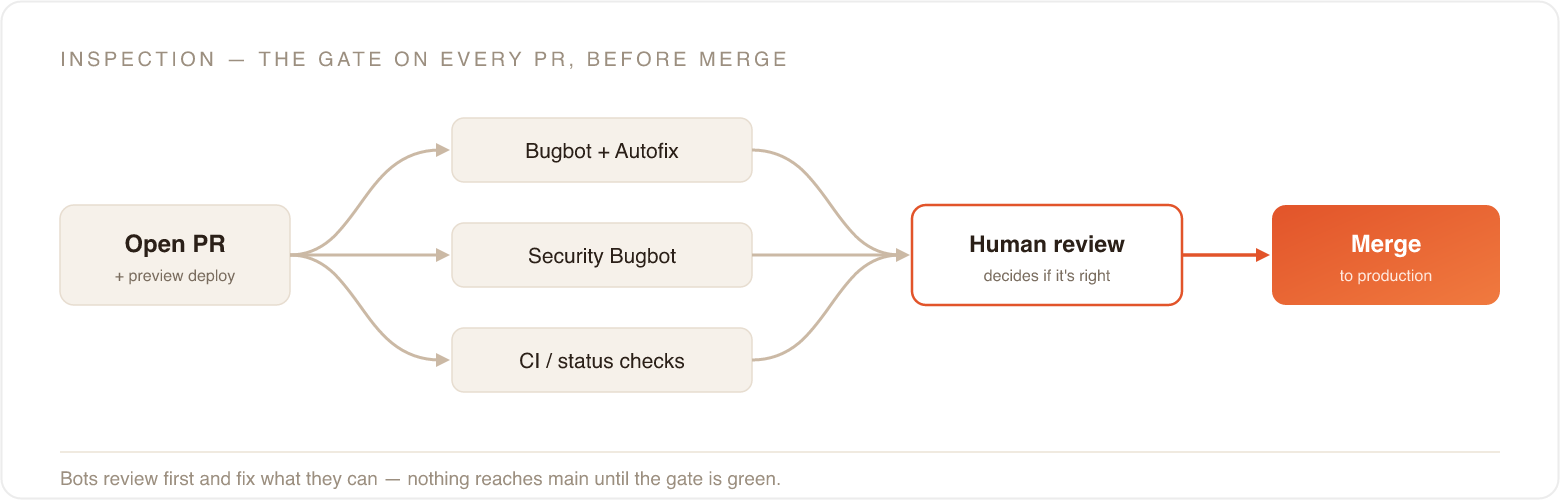
The design choice that matters: this all happens on the open branch, before merge. The review comment, the CI status check, the autofixed commit, they land on the PR while it's still a proposal. Nothing reaches
main until the gate is green. That's the same discipline I wrote about learning the hard way: protected main, every change through a PR. Except now the first reviewer isn't a tired human at 4pm. It's a bot that never skips the diff.Humans still sit at the end of this stage. The job just changes from "find the bugs" to "decide if this change is right." I'll take that trade.
Bugbot lives in the dashboard, not a config file. In the Cursor dashboard, open the Bugbot tab and connect your GitHub org. You'll need org-admin access to install the app. Select the repositories you want reviewed. Start with one. Choose a trigger: run on every PR update, or only when someone comments
bugbot run (or cursor review) on a PR. I'd run it on every PR. Turn on Autofix and pick Create New Branch, so the bot's proposed fix stays on its own branch and you review it as a diff instead of finding it already committed under you.From then on every PR, including the ones an agent opened, gets a second reader before a human ever looks at it.
Shipping, and the loop that closes itself
The last mile is the part CI/CD already did well, and Cursor plugs into it rather than replacing it. The PR carries a preview deploy so you see the change running before it ships. Merge publishes production. The branch squash-merges and disappears. No one runs a deploy by hand.
What makes this more than a very good assistant is the feedback edge. Automations let agents run on schedules or fire on events, and "an incident was declared" or "an error rate crossed a threshold" is an event. A production signal can open the next ticket, which starts the next agent, which opens the next PR. The loop closes without returning to a human keyboard for the routine cases.
Two pieces to wire up here, and the first one isn't Cursor at all.
Protect
main in GitHub first. In your repo settings, add a branch ruleset that requires a pull request, requires status checks to pass, and blocks direct pushes and force-pushes. I learned why the hard way. Without it, an agent can push straight to production and every gate above is pointless.Then wire the feedback edge from the same Integrations page: point an automation at an event you already have, a merged PR, a new Linear issue, a PagerDuty incident, so a production signal can open the next ticket without anyone retyping it.
Here's how the four stages map to what actually does the work:
| SDLC stage | What runs it | Who's in the loop |
|---|---|---|
| Intake | Cursor in Jira / Linear / Slack, event triggers | Whoever files the ticket - no engineer needed to translate it |
| Build | Cloud / Background Agents, grounded by .cursor/rules + MCP | Agent drafts; engineer sets scope and constraints |
| Inspection | Bugbot, Security Bugbot, Bugbot Autofix, CI status checks | Bots review first; human approves the final call |
| Shipping | PR preview deploys, squash-merge to production | Reviewer merges; deploy is automatic |
| Feedback | Automations on schedules + events (incidents, merges, alerts) | Signals reopen intake automatically |
The shortest path to your first working loop
If you want to stop reading and go build it, here's the order I'd do it in. Each step is worth doing even if you never do the next one.
Protect
main first. GitHub branch ruleset: require a PR, require checks, block direct pushes. Ten minutes, and everything downstream depends on it.Turn on Bugbot for one repo, on every PR, with Autofix → Create New Branch. Now you have an automated reviewer even for the code you write yourself.
Add a
.cursor/rules/*.mdc that says main is protected, one PR per logical change, and where the managed files are. This is what keeps agents in their lane.Connect one intake source, Slack, Linear, or Jira, and pick a default repo.
Run one real ticket through it.
@Cursor, one clear instruction, and watch a PR come back. Review the preview, let Bugbot weigh in, merge.Add MCP and one automation once the basic loop feels trustworthy. Ground the agent in your real systems, then let a production event open the next ticket.
Steps 1 and 2 are worth it on their own. Steps 3 through 5 are where it starts to feel like the thing people keep calling a factory. Step 6 is where it starts running without you in the middle.
The part the buzzword leaves out
I'd be doing the same hand-waving I'm complaining about if I stopped there.
A software factory is only as good as the scoping around it. The single most reliable way to break this loop is to hand an agent a vague, three-things-in-one ticket. It produces an un-mergeable mega-diff, and now a human has to untangle it, which is slower than if you'd written it yourself. Everything I learned about one PR, one logical change, matters more in this setup, not less, because the agent will happily produce a huge bad diff at machine speed if you let it. The judgment didn't go away. You spend it on intake and review now instead of on typing.
And none of this works without the boring infrastructure: a genuinely protected
main, meaningful CI, rules files that reflect how your repo actually works, MCP connections to your real systems. Skip those and you don't have a factory. You have an agent making confident guesses into your production branch.Where this actually leaves us
"Software factory" felt hollow for so long because the pipeline could build and ship, but it couldn't decide what to build next or turn intent into a change. Those were the human stages, and they were the bottleneck. What shipped over the last several Cursor releases is exactly those two stages: intake that starts from a ticket or a thread, and a build step that produces a real, reviewable PR.
I don't think this replaces engineers. It moves the work up a level, to scoping what goes in and judging what comes out. For the first time, at least for me, the metaphor isn't just a slide deck.
If you've been rolling your eyes at "AI software factory" the same way I did, fair. Go set up one
@Cursor trigger from your ticketing system, with a protected main and Bugbot on the other end, and run one real ticket through it. See if you still want to roll your eyes after that.