I Almost Didn't Try Cursor. Here's What I Was Wrong About.
I assumed Cursor was VS Code with autocomplete. Five wrong assumptions later, here's what actually changed my mind - and one low-stakes way to find out for yourself.
By Michael Lynn • 6/7/2026
Share:
I almost didn't install Cursor. I'd been burned by AI tools that generated confident garbage, I'd watched the hype cycle roll through my timeline twice, and the pitch sounded familiar: it's VS Code, but smarter. I already had VS Code, and I already had Copilot fatigue up to my eyeballs. Why would I download another editor?
What finally got me to actually try it wasn't a demo video, it was boredom. I had one small, scoped task sitting in my queue - add a null check, write a test, open a PR - and a friend told me to just give Agent Mode that one boring job and read the diff after. So I did. It touched a file I hadn't even opened, ran the tests on its own, and stopped short of pushing anything. That's when I realized I'd had the wrong mental model of the product the whole time.
If you're skeptical the way I was, here's what I got wrong: five assumptions I walked in with, what actually turned out to be true, and one low-stakes way to test it yourself.
TL;DR
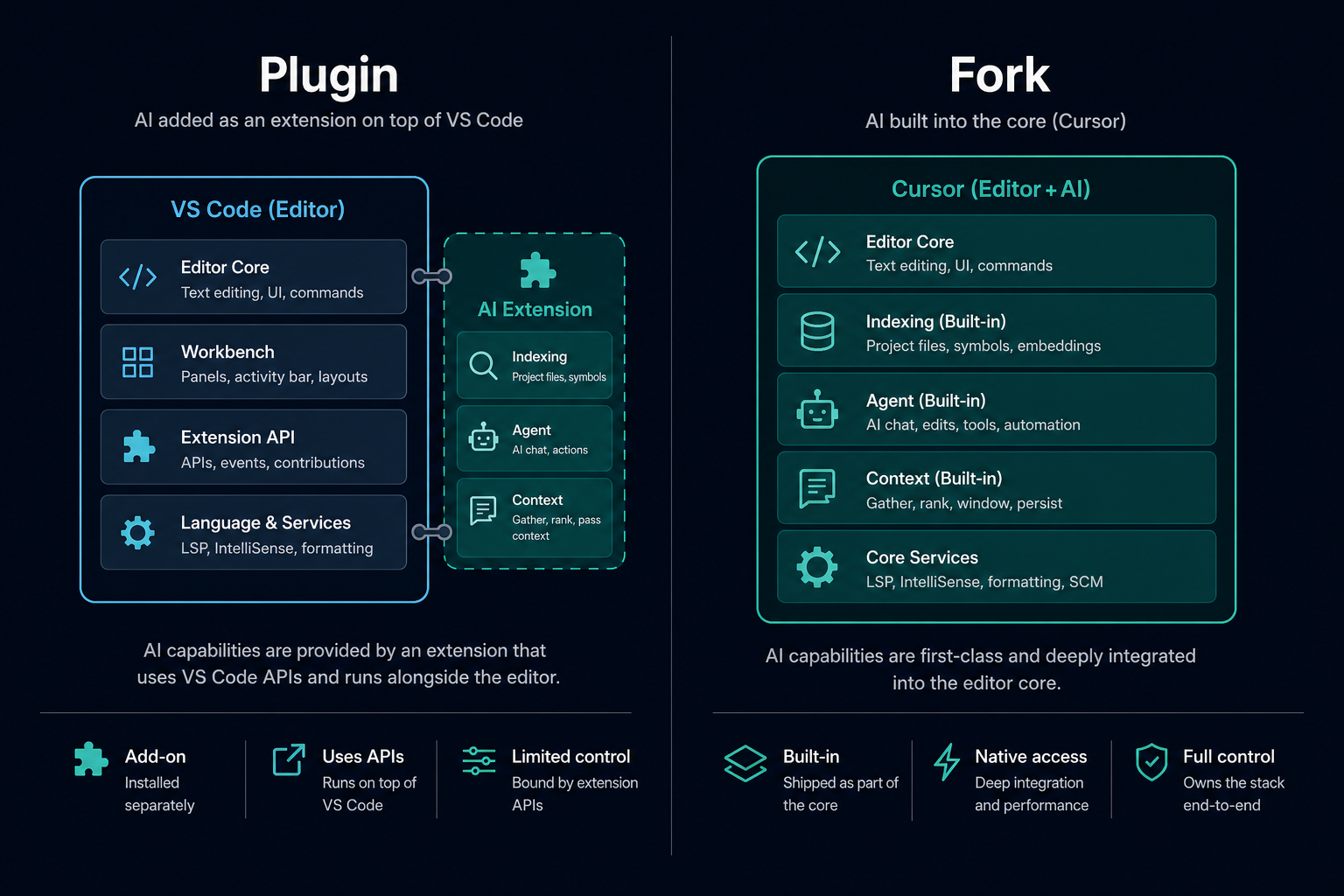
Cursor isn't a VS Code plugin - it's a fork rebuilt around AI, with whole-codebase indexing and multi-file agents baked into the core.
The product defaults push against shipping unreviewed code; you're still the reviewer, not the passenger.
Tab completion is the entry point, not the ceiling - Agent Mode, cloud agents, and toolchain integrations are the actual product now.
What I assumed
What I saw when I actually used it
VS Code with Copilot bolted on
A fork with indexing, agents, and context wired into the editor core
AI writes unreviewed code straight to production
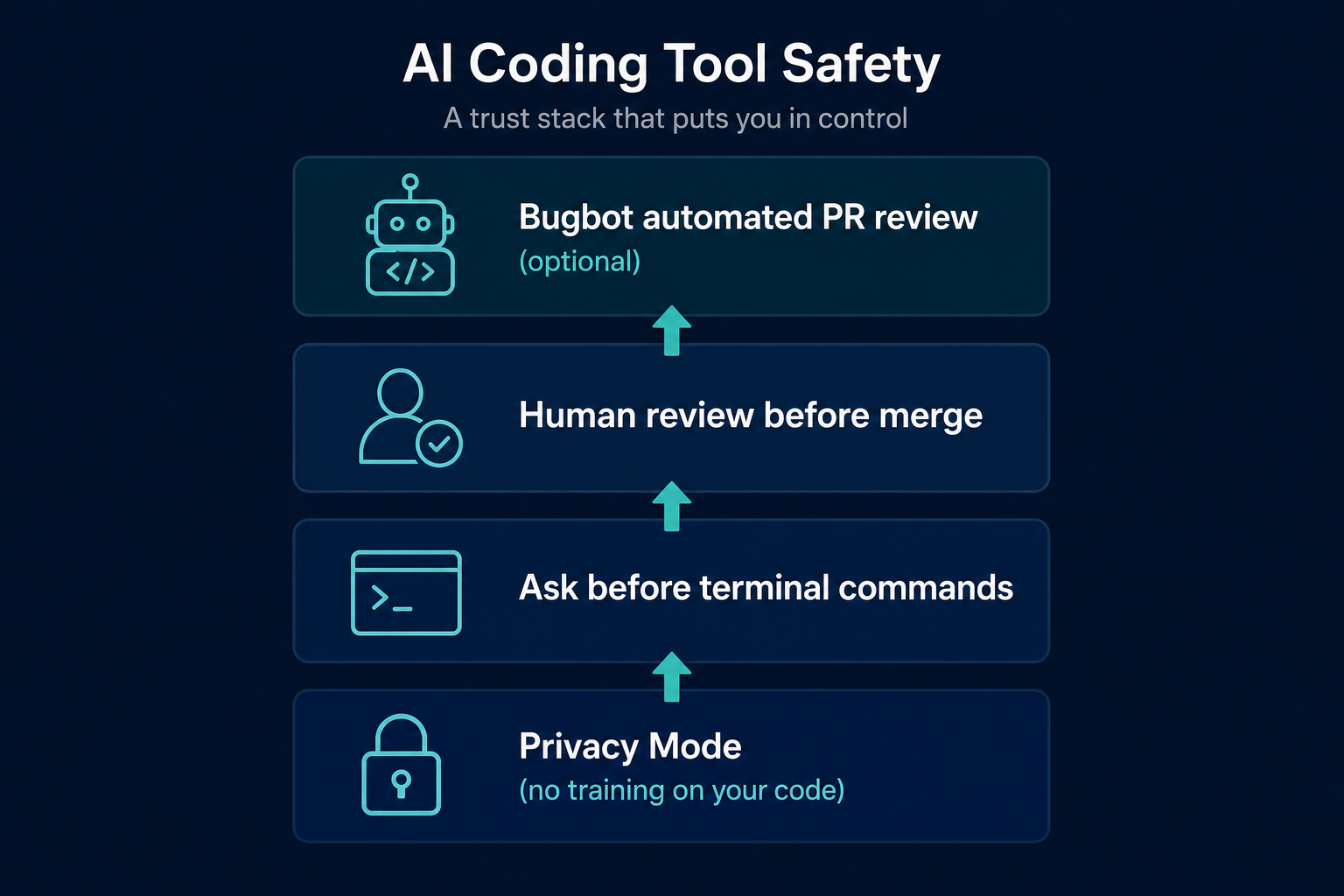
Ask-before-terminal, Privacy Mode, and review gates - I still approve every merge
Fancy autocomplete
Agent Mode that plans, edits across files, runs commands, and waits for me
Another IDE on my laptop
Integrations that start work from Slack, Linear, Jira, and MCP-connected systems
Locked to one AI vendor
Claude, GPT, Gemini, Grok, and Cursor's own models - I pick per task
Free download
5 myths — printable one-pager
Shareable PDF cheat sheet: what skeptics assume vs. what's actually true. Built for team leads passing this around.
Myth 1: "It's just VS Code with Copilot bolted on"
I held onto this one longer than I should have, mostly because the evidence kept agreeing with me. Cursor is, in fact forked from VS Code. My keybindings worked on day one which is great. Most of my extensions loaded without a fight. And it felt familiar, which is precisely why I never looked past that first impression. I filed it under "VS Code plus AI" and went back to work.
Here's what I, and maybe you missed. "Forked from" and "plugin for" aren't the same. They're closer to opposite if we look closely. A plugin gets bolted on, so the model only ever sees what you hand it: the file that's open, a highlighted block, whatever you remembered to @-mention. Cursor's team skipped that path on purpose. No VS Code extension. Instead they rebuilt the editing surface itself, with semantic indexing across the whole codebase, one context model that spans the project instead of one open tab, and agents that can go find what they need instead of waiting on you to spoon-feed them.
What actually convinced me was smaller than any of that. I asked Agent Mode to fix a bug in a utility file I hadn't opened all session. It went and found it. Searched the codebase, tracked down the caller, edited two files, ran the tests. I never tagged a single path. A bolted-on plugin can't do that, because nobody ever gave it an indexing pipeline or an agent loop to work with. Now you'll get better results by providing the specific file context if you have it - but this example proved to me that Cursor was different than a simple AI plugin.
See the difference in 30 seconds
Open Agent Mode and ask it to fix something in a file you haven't opened this session. Watch it search the codebase without you hand-tagging every path.
Myth 2: "AI-assisted coding means unreviewed garbage in production"
Every AI horror story follows the same plot. You accept a diff and didn't read or understand it, merged it, and spent hours undoing the damage. I have to admit I've done this more than once.
That's not how Cursor is built to work. Agent Mode asks before it runs anything in your terminal. Privacy Mode, which is on the free and Pro plans, keeps your code out of training data and puts zero-retention agreements in place with the model providers. Cursor is SOC 2 Type II certified and has the SSO and audit logging teams ask for. None of that does your job for you, though. It just takes away the excuses. I treat what the agent hands back the way I'd treat a pull request from a capable junior engineer: read it, don't rubber-stamp it. And because main is protected and everything goes through a PR, a habit I only picked up the hard way, nothing reaches production even if I get lazy about reviewing.
I still don't trust it blindly, and I don't think you should either. Skip the review step and Cursor will happily generate a bad batch of code at machine speed. It's fast. It isn't wise. That part's still on you.
What actually sold me was one small task. I turned on Privacy Mode, asked for a test covering the null case in checkout, read the diff line by line, ran the preview deploy myself, and only merged once Bugbot and CI both came back green. Nothing shipped because the model "felt confident" about it. It shipped because I reviewed it and approved.
Trust, but verify - with guardrails
Turn on Privacy Mode before your first real task. Pair it with a protected main and PR-only workflow so nothing ships without your sign-off.
Tab completion is the most visible feature, and it's what shows up in every demo clip on Twitter. It's what got me into Cursor in the first place. If you've never opened Agent Mode, assuming the whole product is a very good autocomplete engine... you're missing out on a lot of Cursor's capabilities.
Tab is still excellent. I use it every day. But judging Cursor by Tab is like judging a smartphone by its calculator app. The real center of the product moved to Agent Mode a while ago: hand it a task in plain language and it plans the work, edits across however many files it needs to, runs terminal commands, searches the web if it has to, and checks its own output, with checkpoints so you can roll it back if it goes sideways.
Cloud Agents push it further still. You can kick off work from the web, your phone, or a Slack message, and it runs on Cursor's own infrastructure in an isolated VM, not tied to whether your laptop happens to be open. What comes back is a branch and a PR, not a suggestion floating in a side or popup card or panel.
The moment this actually landed for me: I typed one sentence, "Extract the pricing logic into its own module and update the imports," and got back a four-file diff with tests passing. Tab was never going to attempt that. Tab finishes the line you're typing. Agent Mode finishes the task you described, and those turned out to be very different products.
Skip Tab. Start with Agent Mode.
Open Cursor, press Cmd/Ctrl+I, and describe one small task in plain English. The diff is the demo - not a marketing clip.
An IDE sits on your machine and waits for you to type into it. That's the whole category, as far as I'd ever known it. So I assumed Cursor was just a better local editor with faster completions, a nicer chat panel, still bolted onto via the plugin infrastructure of VS Code.
Again, I was wrong. You can @Cursor someone in a Slack thread. You can assign it work straight from Linear or Jira. It connects to your actual systems through MCP, databases, docs, whatever ticketing tool you use, so the agent is grounding its changes in something real instead of guessing. Bugbot reviews pull requests on its own and can propose a fix on the branch before a human even opens the diff.
"IDE" describes where you edit code. It doesn't describe something that takes in a ticket, builds against it, checks its own work, and loops back with a PR, which is the setup I walked through in more detail in The Software Factory Is Here - and It Runs on Cursor. I won't repeat all of that here. The short version for a skeptic is that the editor is one surface area among several, not the whole product.
Ready for the full loop?
If the Slack-to-PR story landed, I mapped the entire intake → build → inspect → ship workflow in a follow-up post - with setup steps for each stage.
Most tools in this space are tied to their parent company's model stack, so if the underlying model plateaus, the product plateaus with it. Lock-in seemed like the inevitable tradeoff, the same way it always is with this stuff.
Cursor doesn't work that way. It's model-agnostic by design: Claude, GPT, Gemini, Grok, and Cursor's own coding models are all sitting right there, and you pick per task or let Auto decide for you. When a frontier model gets better, you benefit immediately instead of waiting on a vendor's roadmap. Cursor also tunes its agent instructions and tools per model, so it's not just handing you a raw API and calling it a day.
In practice I route models the way I'd route any tool. Something fast for everyday Tab completions and small edits. Something with more reasoning behind it when I'm touching auth, a migration, or anything where a mistake actually costs me. I didn't build a pipeline for any of this. I changed a dropdown.
Pick your model per task
Fast model for everyday edits. Stronger model for auth, migrations, or anything security-sensitive. Change a dropdown - no pipeline required.
You don't need to reorganize your SDLC to find out if your assumptions are wrong. You need one scoped task and five minutes of review.
Open Cursor. Switch to Agent Mode (Cmd/Ctrl+I). Paste something like this:
code-highlightAdd a null check to the checkout total calculation, write a unit test
for the null case, and run the test suite. Do not commit or push -
show me the diff first.
Read every changed line. Run the tests yourself if you want to be sure. If the diff is wrong, tell it what's wrong - that's the job.
If that works for you, I put together the full loop separately - protected main, Bugbot on every PR, @Cursor kicking things off from a ticket. That can wait, though, until you've run the boring version first.
Your move: one task, five minutes
Download Cursor, paste the prompt above, read every changed line, and decide for yourself. No SDLC overhaul required.
What's the assumption that kept you from trying it?
Mine was that I'd seen this movie before - familiar editor, AI bolted on, hype cycle, letdown. Turns out I had the category wrong, and I almost missed something that was worth an afternoon of my time.
If you've been sitting on the sidelines - what's the one assumption that blocked you? I'd guess you're not the only one carrying it.
Still skeptical? Let's talk.
I'm happy to walk through how I use Cursor day to day, or hear what's holding your team back. Grab time on my calendar or connect on LinkedIn.